
PROJECT
Designing the Bureau of Meteorology website
A redesign focused on modernising the Bureau of Meteorology website and improving how Australians find, understand and act on critical weather information across everyday, mobile and high-stakes moments.
Organisation
The Bureau of Meteorology (BOM)
Role
Senior UX & UI Designer
Scope
Website redesign, service journeys, research, design systems, payments & checkout experience
Channels
Web and app
Platforms
Public website, ArcGIS, Mapbox, geospatial design
Timeline
2021-2023
PROJECT SNAPSHOT
Reimagining the Australian weather experience
The Bureau of Meteorology website is one of Australia’s most relied-on public services, supporting millions of people across daily weather checks, travel, agriculture, aviation and emergency contexts.
As a Senior Product Designer and Researcher, I helped redesign a trusted but complex platform so it was easier to use, more accessible and better suited to mobile. The work focused on simplifying critical weather information, strengthening trust, and a creating scalable design language and digital services for forecasts, warnings, maps and location-based experiences.
Key outcomes
Modernised a trusted public service
27% increase in desktop engagement
32% increase in monthly web channel traffic
Improved access to critical weather information with a 48% increase in mobile traffic since launch
Achieved 100% WCAG 2.2 accessibility compliance
Created scalable design patterns
PROJECT
Designing the Bureau of Meteorology website
A redesign focused on modernising the Bureau of Meteorology website and improving how Australians find, understand and act on critical weather information across everyday, mobile and high-stakes moments.
Organisation
The Bureau of Meteorology (BOM)
Role
Senior UX & UI Designer
Scope
Website redesign, service journeys, research, design systems, payments & checkout experience
Channels
Web and app
Platforms
Public website, ArcGIS, Mapbox, geospatial design
Timeline
2021-2023
PROJECT SNAPSHOT
Reimagining the Australian weather experience
The Bureau of Meteorology website is one of Australia’s most relied-on public services, supporting millions of people across daily weather checks, travel, agriculture, aviation and emergency contexts.
As a Senior Product Designer and Researcher, I helped redesign a trusted but complex platform so it was easier to use, more accessible and better suited to mobile. The work focused on simplifying critical weather information, strengthening trust, and a creating scalable design language and digital services for forecasts, warnings, maps and location-based experiences.
Key outcomes
Modernised a trusted public service
27% increase in desktop engagement
32% increase in monthly web channel traffic
Improved access to critical weather information with a 48% increase in mobile traffic since launch
Achieved 100% WCAG 2.2 accessibility compliance
Created scalable design patterns
From trusted legacy service to modern weather platform
The Bureau website was not broken in the traditional sense. Australians trusted it, relied on it, and returned to it constantly. But it carried a digital experience that had become hard to navigate, visually dense, inconsistent and less accessible than it should.
The goal of the redesign was to create a cohesive digital ecosystem of weather experiences while presenting those experiences as modern, engaging moments. Importantly, it was also about protecting the Bureau’s role as a source of truth while making critical weather information easier to find, understand and act on.
01
Turning complexity into a clear design direction
The Bureau’s website serves a wide range of Australians, from people checking the daily forecast to weather dependent audiences in agriculture, aviation, emergency services and transport. The challenge was that the same platform had to support simple everyday tasks as well as more complex, high stakes information needs.
The existing digital experience had accumulated content, pathways and siloed interfaces over time. This created a site that was trusted, but increasingly difficult to scan, navigate and use, especially on mobile.

Process
To begin capturing the ambition of what the website could be, engagement with stakeholders was critical. I worked across research, analysis and stakeholder input to understand where the experience was creating friction. This included reviewing high-traffic journeys, page types, navigation, forecast layouts, warning patterns, maps, data formats and weather station availability, accessibility barriers and mobile behaviour.
The work surfaced several connected problems:
Through pre-discovery work with stakeholders, and estimated 170,000 individual web pages were live and supported across the site.
dense layouts made key weather information harder to prioritise
inconsistent information architecture created fragmented journeys
warnings and urgent updates were not always visually distinct enough
mobile experiences were carrying desktop complexity
accessibility gaps limited access to critical information

Result
This reframed the redesign around a sharper design challenge:
"How might we make BOM modern, accessible and user-friendly without losing the deep trust Australians have for the service?"
This question became the anchor for the work. It communicated that to create true success, the project should not only connect siloed digital experiences but also a visual redesign to help simplify, clarify and systemise the Bureau’s digital experience.
02
Designing for trust, speed and clarity
02
Designing for trust, speed and clarity
Trust was one of the most important constraints in the redesign. The Bureau already had public credibility, so the design work needed to improve usability without making the service feel less authoritative or familiar.
This meant treating trust as a design requirement, not just a brand attribute.

Work began by designing mobile-first layouts, homepage structures, forecast views, warning modules, location search, weather maps, forecast tables and scrollable card patterns. The focus was on helping users quickly answer practical questions:
What is the weather where I am?
Is there a warning I need to know about?
What is changing today or this week?
Where can I find more detailed forecast, rain or map information?
Process
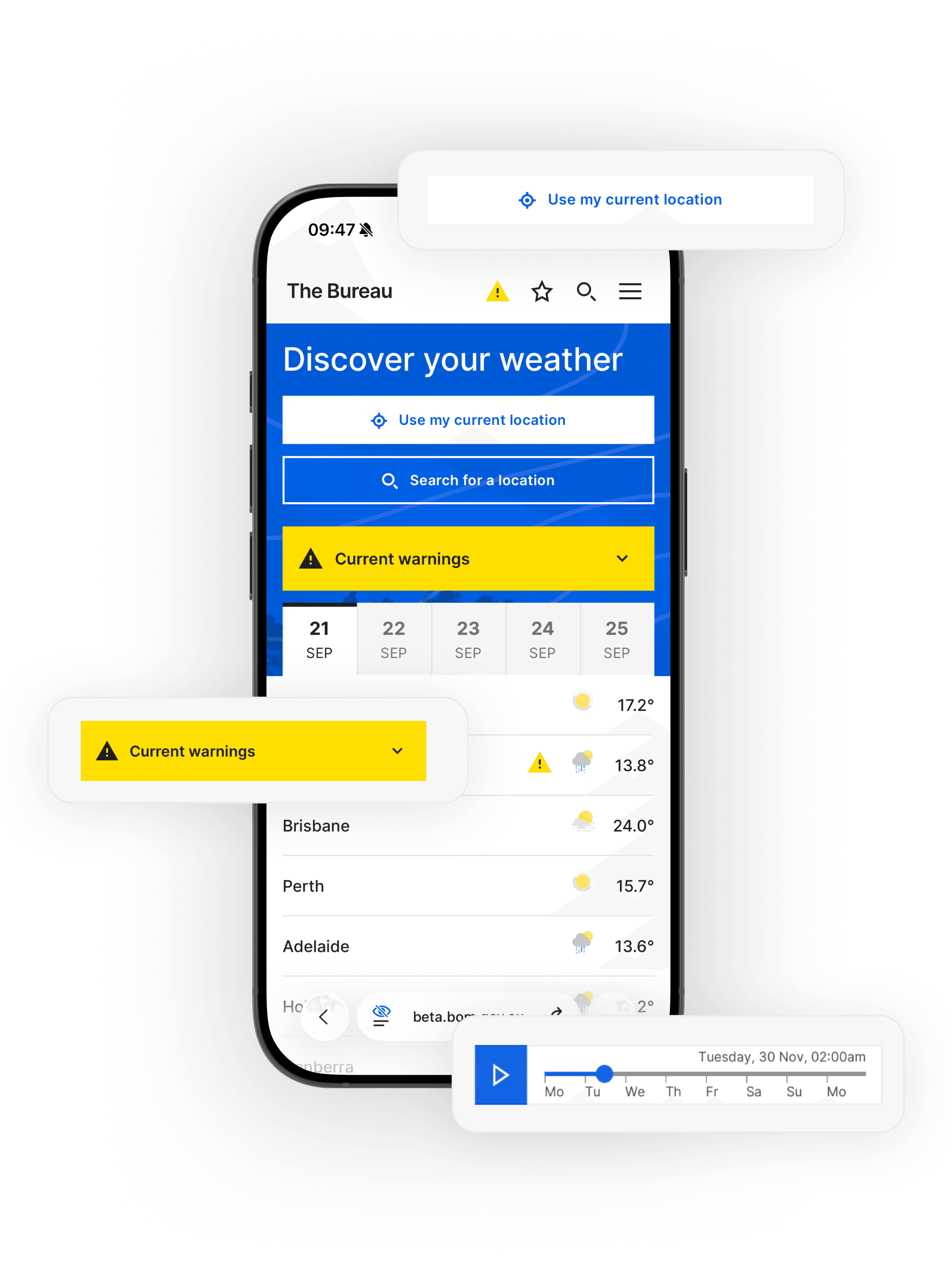
The design direction focused on making weather information easier to interpret in the moments people need it most. Forecasts, warnings, maps and location-based information were redesigned around clearer hierarchy, stronger content priority and more consistent interaction patterns.
Result
The redesigned experience made common weather tasks feel more direct and less effortful. Users could more easily find their location with one tap, scan current conditions, identify warnings, access specialised local forecasts and move between related weather information without needing to decode a dense interface.
Prioritising everyday weather needs helped people find the right information faster and with less effort.
02
Designing for trust, speed and clarity
Trust was one of the most important constraints in the redesign. The Bureau already had public credibility, so the design work needed to improve usability without making the service feel less authoritative or familiar.
This meant treating trust as a design requirement, not just a brand attribute.
Process
The design direction focused on making weather information easier to interpret in the moments people need it most. Forecasts, warnings, maps and location-based information were redesigned around clearer hierarchy, stronger content priority and more consistent interaction patterns.
Work began by designing mobile-first layouts, homepage structures, forecast views, warning modules, location search, weather maps, forecast tables and scrollable card patterns. The focus was on helping users quickly answer practical questions:
Process
The design direction focused on making weather information easier to interpret in the moments people need it most. Forecasts, warnings, maps and location-based information were redesigned around clearer hierarchy, stronger content priority and more consistent interaction patterns.
Work began by designing mobile-first layouts, homepage structures, forecast views, warning modules, location search, weather maps, forecast tables and scrollable card patterns. The focus was on helping users quickly answer practical questions:
What is the weather where I am?
Is there a warning I need to know about?
What is changing today or this week?
Where can I find more detailed forecast, rain or map information?
Result
The redesigned experience made common weather tasks feel more direct and less effortful. Users could more easily find their location with one tap, scan current conditions, identify warnings, access specialised local forecasts and move between related weather information without needing to decode a dense interface.
Prioritising everyday weather needs helped people find the right information faster and with less effort.
03
Building a scalable system
A site at the Bureau’s scale could not be solved through isolated page redesigns. The work needed to create a reusable foundation that could support different weather products, page types, devices and future service needs.

Establishing a 200+ component design system created the flexibility and granularity needed to support richer, more consistent weather experiences.
Process
I developed reusable patterns across forecast tiles, warning states, tables, map controls, menus, icons, responsive layouts and location-based experiences. These components were shaped by usability needs, accessibility requirements and the complexity of weather data and became the basis the new Bureau Design System, supporting a unified experience across web and app channels.
Accessibility and inclusivity were also built into the system rather than treated as a final review layer. This included colour contrast, text scaling, keyboard navigation, ARIA support, interaction states, labelling and responsive readability aligned to WCAG 2.2 guidelines, helping to support impaired and culturally and linguistically diverse (CALD) users across our weather journeys.

Using Esri and ArcGIS, we made real-time interactive weather data accessible across every device.

Localised forecasts helped people plan with greater confidence, from today through to the weeks ahead.
Result
The redesign created a strong set of foundational weather experiences, fostered by deep collaboration with stakeholders and the creation of the Bureau design system, acting as the visual foundation for the Bureau website. Instead of continuing to solve weather pages one at a time, scalable experiences were created that supported consistency, accessibility and future product evolution.
04
Validating the work in real world conditions
Because the Bureau serves both everyday and specialist audiences, the redesign needed to be tested across a wide range of segments and industries. It had to work for real users, agency partners, stakeholders and weather-dependent audiences.
Process
Designs were refined through ongoing feedback loops and specialist consultations, including usability testing, customer interviews, targeted surveys, subject matter expert reviews, stakeholder feedback, closed beta activity and public beta feedback.
Each round helped improve layout, content hierarchy, navigation, interaction patterns and accessibility. The validation process also helped balance competing needs: keeping the experience simple for general users while preserving enough depth for users who rely on detailed weather information.

Designing for both everyday and specialised users created more relevant ways to interact with the site and its services.
Result
The redesign moved from concept to a more reliable, tested public service experience. Feedback helped confirm what was working, identify where the experience still needed refinement, and ensure the final direction held up in real-world use.
05
Results
05
Results
The redesigned Bureau website moved the experience from a dense legacy interface toward a clearer, more usable and more scalable public weather platform. It contributed to:
More importantly, it helped Australians access critical weather information with less effort and greater confidence.
27% increase in desktop engagement
50% increase in mobile traffic since launch
95% WCAG 2.2 accessibility compliance
32% increase in monthly web channel traffic

PROJECT
Designing the Bureau of Meteorology website
A redesign focused on modernising the Bureau of Meteorology website and improving how Australians find, understand and act on critical weather information across everyday, mobile and high-stakes moments.
Organisation
The Bureau of Meteorology (BOM)
Role
Senior UX & UI Designer
Scope
Website redesign, service journeys, research, design systems, payments & checkout experience
Channels
Web and app
Platforms
Public website, ArcGIS, Mapbox, geospatial design
Timeline
2021-2023
From trusted legacy service to modern weather platform
A site at the Bureau’s scale could not be solved through isolated page redesigns. The work needed to create a reusable foundation that could support different weather products, page types, devices and future service needs.
A large part of the work was helping different teams move in the same direction.
I worked across product, content, service design, app, development and stakeholder groups to make the work understandable, useful and deliverable.
Organisation
VicRoads
Role
Lead Product Designer
Lead UX Researcher
Scope
Web; App; Design Systems; CMS; Headless Web; Brand; Service Journeys
Platform
Web; App; Adobe AEM; Sitecore
Timeline
2025-current
01
Turning complexity into a clear design direction
The Bureau’s website serves a wide range of Australians, from people checking the daily forecast to weather dependent audiences in agriculture, aviation, emergency services and transport. The challenge was that the same platform had to support simple everyday tasks as well as more complex, high stakes information needs.
The existing digital experience had accumulated content, pathways and siloed interfaces over time. This created a site that was trusted, but increasingly difficult to scan, navigate and use, especially on mobile.
Process
To begin capturing the ambition of what the website could be, engagement with stakeholders was critical. I worked across research, analysis and stakeholder input to understand where the experience was creating friction. This included reviewing high-traffic journeys, page types, navigation, forecast layouts, warning patterns, maps, data formats and weather station availability, accessibility barriers and mobile behaviour.
The work surfaced several connected problems:
Through pre-discovery work with stakeholders, and estimated 170,000 individual web pages were live and supported across the site.
dense layouts made key weather information harder to prioritise
inconsistent information architecture created fragmented journeys
warnings and urgent updates were not always visually distinct enough
mobile experiences were carrying desktop complexity
accessibility gaps limited access to critical information
Result
This reframed the redesign around a sharper design challenge:
"How might we make BOM modern, accessible and user-friendly without losing the deep trust Australians have for the service?"
This question became the anchor for the work. It communicated that to create true success, the project should not only connect siloed digital experiences but also a visual redesign to help simplify, clarify and systemise the Bureau’s digital experience.
02
Designing for trust, speed and clarity
Trust was one of the most important constraints in the redesign. The Bureau already had public credibility, so the design work needed to improve usability without making the service feel less authoritative or familiar.
This meant treating trust as a design requirement, not just a brand attribute.
Work began by designing mobile-first layouts, homepage structures, forecast views, warning modules, location search, weather maps, forecast tables and scrollable card patterns. The focus was on helping users quickly answer practical questions:
What is the weather where I am?
Is there a warning I need to know about?
What is changing today or this week?
Where can I find more detailed forecast, rain or map information?
Process
The design direction focused on making weather information easier to interpret in the moments people need it most. Forecasts, warnings, maps and location-based information were redesigned around clearer hierarchy, stronger content priority and more consistent interaction patterns.
Result
The redesigned experience made common weather tasks feel more direct and less effortful. Users could more easily find their location with one tap, scan current conditions, identify warnings, access specialised local forecasts and move between related weather information without needing to decode a dense interface.
Prioritising everyday weather needs helped people find the right information faster and with less effort.
03
Building a scalable system
Establishing a 200+ component design system created the flexibility and granularity needed to support richer, more consistent weather experiences.
Process
I developed reusable patterns across forecast tiles, warning states, tables, map controls, menus, icons, responsive layouts and location-based experiences. These components were shaped by usability needs, accessibility requirements and the complexity of weather data and became the basis the new Bureau Design System, supporting a unified experience across web and app channels.
Accessibility and inclusivity were also built into the system rather than treated as a final review layer. This included colour contrast, text scaling, keyboard navigation, ARIA support, interaction states, labelling and responsive readability aligned to WCAG 2.2 guidelines, helping to support impaired and culturally and linguistically diverse (CALD) users across our weather journeys.
Using Esri and ArcGIS, we made real-time interactive weather data accessible across every device.
Localised forecasts helped people plan with greater confidence, from today through to the weeks ahead.
Result
The redesign created a strong set of foundational weather experiences, fostered by deep collaboration with stakeholders and the creation of the Bureau design system, acting as the visual foundation for the Bureau website. Instead of continuing to solve weather pages one at a time, scalable experiences were created that supported consistency, accessibility and future product evolution.
04
Validating the work in real world conditions
Because the Bureau serves both everyday and specialist audiences, the redesign needed to be tested across a wide range of segments and industries. It had to work for real users, agency partners, stakeholders and weather-dependent audiences.
Process
Designs were refined through ongoing feedback loops and specialist consultations, including usability testing, customer interviews, targeted surveys, subject matter expert reviews, stakeholder feedback, closed beta activity and public beta feedback.
Each round helped improve layout, content hierarchy, navigation, interaction patterns and accessibility. The validation process also helped balance competing needs: keeping the experience simple for general users while preserving enough depth for users who rely on detailed weather information.
Designing for both everyday and specialised users created more relevant ways to interact with the site and its services.
Result
The redesign moved from concept to a more reliable, tested public service experience. Feedback helped confirm what was working, identify where the experience still needed refinement, and ensure the final direction held up in real-world use.
05
Results
The redesigned Bureau website moved the experience from a dense legacy interface toward a clearer, more usable and more scalable public weather platform. It contributed to:
More importantly, it helped Australians access critical weather information with less effort and greater confidence.
27% increase in desktop engagement
50% increase in mobile traffic since launch
95% WCAG 2.2 accessibility compliance
32% increase in monthly web channel traffic
The Bureau website was not broken in the traditional sense. Australians trusted it, relied on it, and returned to it constantly. But it carried a digital experience that had become hard to navigate, visually dense, inconsistent and less accessible than it should.
The goal of the redesign was to create a cohesive digital ecosystem of weather experiences while presenting those experiences as modern, engaging moments. Importantly, it was also about protecting the Bureau’s role as a source of truth while making critical weather information easier to find, understand and act on.
The redesign was not a single project with a neat beginning and end. It was a set of connected initiatives aimed at making the website clearer, more useful and easier to maintain over time.
The challenge was not only to redesign the website but helping teams make better decisions across a complex service ecosystem: what to prioritise, what to simplify, what to standardise and how to bring people along.

PROJECT SNAPSHOT
Reimagining the Australian weather experience
The Bureau of Meteorology website is one of Australia’s most relied-on public services, supporting millions of people across daily weather checks, travel, agriculture, aviation and emergency contexts.
As a Senior Product Designer and Researcher, I helped redesign a trusted but complex platform so it was easier to use, more accessible and better suited to mobile. The work focused on simplifying critical weather information, strengthening trust, and a creating scalable design language and digital services for forecasts, warnings, maps and location-based experiences.
Key outcomes
Modernised a trusted public service
27% increase in desktop engagement
32% increase in monthly web channel traffic
Improved access to critical weather information with a 48% increase in mobile traffic since launch
Achieved 100% WCAG 2.2 accessibility compliance
Created scalable design patterns